Posts

Showing posts with the label howto

Enable compcache in ubuntu

Sometimes I'm running a lot of VM? which needs a lot of memory, so i try to enable compcache: vim /etc/initramfs-tools/initramfs.conf #Edit this line: COMPCACHE_SIZE="60 %" update-initramfs -u reboot After enabled, you can see new swap device (ramzswap): cat /proc/swaps Filename Type Size Used Priority /dev/ramzswap0 partition 1229208 0 100 /dev/sda3 partition 2064344 0 -1 http://code.google.com/p/compcache/
How to mirror wiki for offline reading

Change: wiki.zimbra.com to preferred site

All IM integrated

This is how to integrate all known IM to google talk or jabber. So we can use single client to chat, for example i'm using Talk on android 1. To setup we need advanced jabber client, pidgin or psi-im 2. Add account on pidgin using XMPP protocol 3. Enter your google username, save and online 4. Menu: Tools -> Plugins, enable XMPP Service Discovery 5. Tools -> XMPP Service Discovery, Browse, enter silper.cz or fsinf.at 6. To register yahoo messenger: Double click yahoo2.silper.cz, enter yahoo username and password 7. Wait for approval 8. Accept all chat invite You can also register other available service there. Edit: use fsinf.at instead

OpenDNS atau Google public DNS

Mau pake OpenDNS atau Google public DNS? Pake dua-duanya aja, ini isi resolv.conf di laptop gw: $ cat /etc/resolv.conf options rotate nameserver 208.67.222.222 nameserver 8.8.8.8 options rotate digunakan untuk menggunakan dns secara bergantian. biar isi resolv.conf ngga berubah karena network manager atau pppd, set immutable: $ chattr +i /etc/resolv.conf

Chatting lokal (LAN)

Image
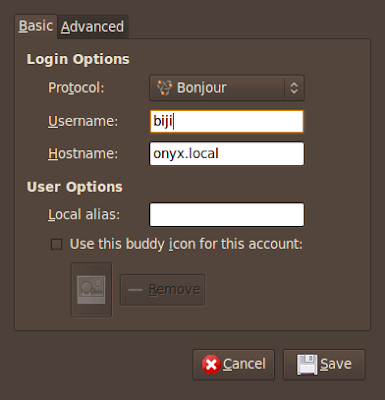
Ok..... gimana caranya chatting lokal antara teman sekantor? tapi bukan menggunakan Yahoo messenger, Jabber, MSN, dll... chatting tanpa menggunakan Server? Dengan menggunakan pidgin kita bisa chatting di LAN tanpa menggunakan server. Protokol yang digunakan adalah Bonjour. Tambahkan account di masing-masing komputer: Ubah First Name dan Last Name: Setelah itu login dan semua user di LAN otomatis akan muncul di Buddy List: - Bonjour menggunakan backend Avahi (zeroconf) ... kompatibel di Windows, OSX, Linux.. ini yang bikin keren ^^ - all screenshot taken from Ubuntu Intrepid Beta

Lenovo g410 on Hardy

Image
Ini pertama kali gw nginstal ubuntu di notbuk.. Ubuntu Hardy itu simple tapi high quality ^^ Audio : langsung jalan pake ALSA Card reader : langsung jalan gak perlu driver Networking: Ethernet : langsung jalan Networking: Wireless sudo apt-get install b43-fwcutter dah jalan.. tapi blom pernah coba konek Communications: Modem pake slmodem bawaan ubuntu nggak jalan, jadi download dari sini: http://linmodems.technion.ac.il/packages/smartlink/ download yg ini: SLMODEMD.gcc4.2.tar.gz extract, pindahin slmodemd ke /usr/sbin tambahin di /etc/rc.local: /usr/sbin/slmodemd -a modem:0 & wvdial.conf buat telkomnet instan: [Dialer i] Init1 = ATZ Init2 = ATQ0 V1 E1 S0=0 &C1 &D2 +FCLASS=0 Init3 = AT+MS=34 Phone = 080989999 Username = telkomnet@instan Password = telkom Modem = /dev/modem VGA Controller jalanin: sudo displayconfig-gtk Screen 1 -> Model: pilih LCD 1680x1050 (centangin wide screen) Graphics Card -> Driver: pilih intel Klik OK trus relogin Processor Biar bisa pilih...

My phone can be telneted

cool...... my phone can be telneted... not emulated, but real operating system This how i did it: 1. First you have to reflash your phone using PoL (Power of Linux) enabled firmware, use monster pack 2. Enable USB-Lan .... go to Menu -> PoL -> USB-Lan Setup 3. Activate FTP & Telnet using same menu 4. setup IP Address for new detected device: 192.168.1.16 / 255.255.255.0 or: # /sbin/ifconfig usb0 192.168.16.1 5. try to ping your phone..... yup you can ping your phone # ping 192.168.16.2 PING 192.168.16.2 (192.168.16.2) 56(84) bytes of data. 64 bytes from 192.168.16.2: icmp_seq=1 ttl=64 time=5.24 ms 64 bytes from 192.168.16.2: icmp_seq=2 ttl=64 time=1.03 ms 64 bytes from 192.168.16.2: icmp_seq=3 ttl=64 time=1.03 ms --- 192.168.16.2 ping statistics --- 3 packets transmitted, 3 received, 0% packet loss, time 2007ms rtt min/avg/max/mdev = 1.034/2.439/5.248/1.986 ms 6. Now the fun begin: # telnet 192.168.16.2 Trying 192.168.16.2... Connected to 192.168.16.2. Escape character is ...

UNSUB BANJIR

Untuk berlangganan ketik SUB BANJIR kirim sms ke 2222 Untuk berhenti berlangganan ketik UNSUB BANJIR kirim sms ke 2222 Tarif per SMSnya Rp 2000,- (belum termasuk pajak) Kalau berlangganan.. rumah kamu bakal kebanjiran setahun sekali.

WTK 2.5.1 requires GLIBC_2.4 hack

been playing WTK but WTK 2.5.1 requires GLIBC_2.4 and I'm using opensuse 10.0 which has lower glibc :( this is the hack found in sun forum: install wtk as usual cd wtk (where you install it) grep -ral GLIBC_2.4 bin | xargs perl -pe 's/GLIBC_2.4/GLIBC_2.2/g; s/\cTii\cM/\cRii\cM/g' -i~ echo 'void __stack_chk_fail(void){void abort(); abort();}' | cc -x c - -shared -o bin/kludge.so LD_PRELOAD=`pwd`/bin/kludge.so ./bin/ktoolbar

Local Installation of PEAR

Suppose you want to create local installation of PEAR, do this: # /usr/local/php/bin/pear config-create `pwd` pearrc # ls CVS incubator khad pearrc Zend # /usr/local/php/bin/pear -c pearrc install -a PEAR # ls CVS incubator khad pear pearrc Zend # ./pear/pear -c pearrc install -a Net_IMAP # ls pear cache data docs pear peardev pecl php tests # ls pear/php Archive Console Net OS PEAR pearcmd.php PEAR.php peclcmd.php Structures System.php XML # ./pear/pear -c pearrc list Installed packages, channel pear.php.net: ========================================= Package Version State Archive_Tar 1.3.2 stable Console_Getopt 1.2.2 stable Net_IMAP 1.0.3 stable Net_Socket 1.0.6 stable PEAR 1.5.0 stable Structures_Graph 1.0.2 stable XML_RPC 1.5.1 stable That's it stolen from http://embartp.nadlinux.com/?p=7

Update iPod without iTunes

Easy: Download firmware for your iPod from http://www.felixbruns.de/iPod/firmware/ for my 2nd gen Nano, I choose Nano 2G (19.x.x.x) extract downloaded file (ipsw) unzip iPodxxxx.ipsw Flash the extracted file (Firmware*) to empty partition in your iPod dd if=Firmware-x.x.x of=/dev/sda1 For more info see: http://ipodlinux.org/Restore_without_iTunes

HOWTO Perpanjang SIM A

Howto untuk perpanjang SIM A tanpa calo ^^ Howto ini kemungkinan juga mirip untuk bikin SIM baru, SIM C, dan SIM lainnya. Persiapan: 1. Pake sepatu 2. Pulpen 3. Uang kira2 150rebu 4. Foto kopi KTP dan SIM Tempat: Daan mogot (SAMSAT) Jam kerja: 8.00 sampai 12.00 Langkah2nya: Pertama datang bayar parkir motor atau mobil. Trus masuk lewat pintu depan, kasih lihat KTP. Trus ke kanan, cari loket pemeriksaan kesehatan. Bayar 10rebu, kasih KTP asli & foto kopi SIM Abis itu masuk ke ruangan kesehatan, periksa mata (disuruh baca tulisan kecil2) Trus nunggu di luar, sampai dipanggil namanya. Ntar dikasih hasil test kesehatan. Langkah selanjutnya, minta form asuransi dan isi. Trus kasih form asuransi, bayar 15rebu. Lalu beli formulir perpanjang SIM (60rebu) atau formulir bikin SIM baru (75rebu). Isi formulirnya. Trus kasih formulir ke loket nomor 21 beserta SIM asli yang lama dan foto kopi KTP. Ntar dia kembaliin KTP kita yg asli. Lokasi loket nomor 21: kalau tadi belok kanan untuk ke pemerik...

Treo 650 Continuous Restart (Looping)

You have just installed a PRC (Palm Application) You have just hotsync your treo But then it restart continuously (after palmone logo, it restart again) All you have to do is system reset This will disable backround applications, phone, bluetooth etc. Now you have to delete PRC which cause resets Preferably using Filez, or Application Delete menu After deleting do soft reset, and your treo will back to normal. But how to run application to delete PRC ? (pressing Home Button resets treo again) This is serious problem... You know you can do Hard Reset to get out of this problem but it will clear all your data, all your config, clears everything. Don't be panic Do system reset again Now, don't press Home Button go to Phone by pressing Green (Phone) button Press DOWN button several times, to view Favorites Button Edit blank favorite button, to run your application (for example Filez, or NVBackup) Press the favorite button, then your apps shown without crash Do something with your a...

Extension Firefox 1.5

Untuk Firefox 1.5, berikut ini list extension yang keren-keren dan gw pake berikut penjelasannya: Restart Firefox, nambahin menu utk restart Adblock, ngeblok iklan-iklan di situs Install New Theme, untuk ganti theme Tabbrowser Preferences, untuk tab di browser biar lebih keren NoScript, biar ngga kena virus Image Zoom, emmm buat kaskus kali ya Mouse Gestures, execute command using mouse gestures wmlbrowser, utk ngeliat situs wap SessionSaver, biar kalo crash tabnya ngga ilang Cara nginstall Extension, Tools -> Extensions -> Get More Extensions. Jangan lupa restart firefox, abis nginstall extension.

Bootable USB using GRUB

I have successfully boot Linux (Damn Small Linux) from my USB stick (iPod shuffle). I'm using GRUB boot loader instead of SYSLINUX, because more advanced features in GRUB. 0 Copy required *stage* to /mnt/ipod/boot/grub and setup /mnt/ipod/boot/grub/menu.lst Contents of my menu.lst: color magenta/blue black/magenta timeout 50 default 0 title Linux kernel (hd0,0)/boot/linux24 ramdisk_size=100000 init=/etc/init lang=us apm=power-off vga=791 nomce noapic quiet BOOT_IMAGE=knoppix initrd (hd0,0)/boot/minirt24.gz These are the tricky steps: 1 grub-install --root-directory=/mnt/ipod --recheck /dev/sda 2 vi /mnt/ipod/boot/grub/device.map Change the contents to: (fd0) /dev/fd0 (hd0) /dev/sda 3 grub-install --root-directory=/mnt/ipod /dev/sda 4 grub-install --root-directory=/mnt/ipod /dev/sda1 NOTES: change /mnt/ipod to your usb mount point change /dev/sda to /dev/sdb if detected as sdb

Baca Detik.com tanpa Iklan?

Detik.com semakin hari semakin ngga tau malu iklannya. Gimana kalau kita bisa baca detik.com tanpa iklan? Seru kan! Mungkin kalau kamu lepelnya udah adpance, artikel ini biasa-biasa aja. Tapi coba dibaca terus sampai bawah, yang penting pilter-nya. QUOTE: pake pairpok dan adblock mah gue udah laha Caranya begini: 1. Pake browser Firefox, download di sini: http://mozilla.org 2. Download Extension Adblock, downloadnya di sini: http://ftp.mozilla.org/pub/mozilla.org/extensions/adblock/adblock-0.5.2.039-fx.xpi 3. Abis install Extension Adblock, File - quit dari Firefox , trus jalanin lagi 4. Trus pilih menu, Tools - Adblock - Preferences 5. Pilih Enable Adblock 6. Trus add filter-filter di bawah ini: */tpl/daftar/* */images/detikhot/* */images/abg/* */images/bisnis/* */images/inet/* */images/wp/* */adv/frame-news/* */images/peristiwa/* 7. Filter untuk website lainnya ;) http://ad.doubleclick.net/* http://ads.osdn.com/* *paypopup.com* http://kasku...