Posts

Solve video tearing on nVidia + GNOME 3

Most important is:  I'm using two monitor using TwinView, which have different refresh rate. I'm playing movie on second monitor. Go to Nvidia Settings, click X Screen 0 - X Server XVideo Settings, Sync to this display device: Choose my second monitor The other settings in referenced URL is for 3D application / OpenGL Check it out: http://sn0v.wordpress.com/2012/01/09/solve-video-tearing-on-nvidia-gnome-3/
How to mount Android on Ubuntu

Starting from ICS, android phone can not be mounted as raw filesystem, but MTP instead. Use this app to mount your Android on Ubuntu, without problem: https://github.com/hanwen/go-mtpfs

Cara maksa move to sd card (android)

Install android SDK dulu khad@onyx:~$ adb devices List of devices attached CB5A1HAB4A    device    (device harus kedetek) khad@onyx:~$ adb shell shell@android:/ $ pm set-install-location 2 shell@android:/ $ exit Lalu masuk ke menu  android, Settings - Apps - On SD Card Aplikasi yg tadinya tidak bisa dipindahkan, sekarang bisa Move to SD card Note: Semakin sedikit sisa free space, akan semakin lemot android saat write data http://www.bongizmo.com/blog/speed-up-android-phone-free-up-internal-storage/ http://www.bongizmo.com/blog/moving-all-android-apps-to-sdcard-apps2sd-froyo/

Learning SPAM from gmail.com :)

vi .fetchmailrc poll imap.gmail.com with proto IMAP user 'xxxx@gmail.com' there with password 'xxxx' options keep ssl sslfingerprint '23:07:E6:52:04:EC:0E:45:65:9B:39:10:63:F0:E7:95' folder [Gmail]/Spam mda '/usr/bin/spamc -u amavis -L spam' keep no rewrite poll alt1-mail.ssss.com with proto IMAP user 'xxxx@xxxx.com' there with password 'xxxx' folder INBOX.Spam options ssl sslfingerprint 'FB:9D:14:94:FD:F1:C6:87:0E:73:6A:A5:9F:2B:CF:5D' mda '/usr/bin/spamc -u amavis -L spam' keep no rewrite poll alt1-mail.ssss.com with proto IMAP user 'xxxx@xxxx.com' there with password 'xxxx' folder INBOX.NotSpam options ssl sslfingerprint 'FB:9D:14:94:FD:F1:C6:87:0E:73:6A:A5:9F:2B:CF:5D' mda '/usr/bin/spamc -u amavis -L forget' keep no rewrite poll alt1-mail.ssss.com with proto IMAP user 'yyyy' there with password 'yyyy' folder INBOX.Spam options ssl sslfingerprint 'F...

Postfix complete install

(in progress) aptitude install postfix pilih: internet site aptitude install postfix-mysql mysql-client mysql-server aptitude install courier-authdaemon courier-authmysql aptitude install courier-imap courier-imap-ssl courier-pop courier-pop-ssl create dir for web based admin: Yes dpkg -r --force-depends gamin libgamin0 aptitude install fam libfam0 aptitude install libsasl2-modules-sql ------------ aptitude install postfixadmin service apache2 restart Buka pake browser: http://ip.address/postfixadmin/setup.php masukin password, submit, copas ke /etc/postfixadmin/config.inc.php  $CONF['setup_password'] = 'bla bla bla'; ubah juga:  $CONF['domain_path'] = 'YES'; $CONF['quota'] = 'YES'; masukin password tadi, masukin email login admin dan passwordnya Buka pake browser: http://ip.address/postfixadmin/ Tambahin domain dan mailbox ------------ Liat password db di /etc/postfixadmin/dbconfig.inc.php vi ...

Change timezone after OS installed

Ubuntu server: # dpkg-reconfigure tzdata CentOS: # rm /etc/localtime # ln -s /usr/share/zoneinfo/Asia/Jakarta  /etc/localtime # reboot

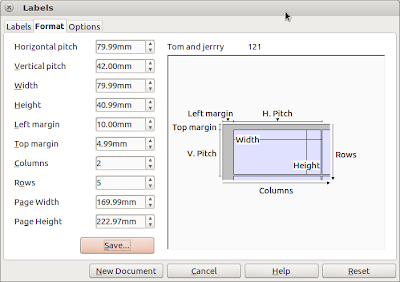
Setting open office u label tom & jerry

Image
Tom & Jerry no 121 Berikut cara membuat dokumen label untuk stiker tom & jerry: File - New Database (buat database baru dan isinya, import dari spreadshet juga bisa) File - New Labels, setting seperti gambar di atas untuk stiker tom & jerry nomor 121 Klik New Document Klik Print, jawab yes, kemudian pilih record yg mau di print

Using Firefox now, Google chrome trashing my disk :(

I stop using Firefox now, because Google chrome trashing my disk :( (wake up disk too often in laptop mode) To check what is using your disk: stop rsyslog echo 1 > /proc/sys/vm/block_dump watch 'dmesg -T | tail -35 ' Misc: You may want to add commit=600,relatime to / and /home to /etc/fstab Read also: eatmydisk

Mysql on low memory system

This will reduce mysql memory usage on system with low memory, for example 256MB: Edit /etc/mysql/my.cnf [mysqld] .... innodb=OFF default-storage-engine=MyISAM .... service mysql restart

Custom script: set cpu governor to powersave

Custom script to set cpu governor to powersave when using battery, and return to ondemand when plugged cat /etc/pm/power.d/90khad #!/bin/sh batt() { echo powersave > /sys/devices/system/cpu/cpu0/cpufreq/scaling_governor echo powersave > /sys/devices/system/cpu/cpu1/cpufreq/scaling_governor echo powersave > /sys/devices/system/cpu/cpu2/cpufreq/scaling_governor echo powersave > /sys/devices/system/cpu/cpu3/cpufreq/scaling_governor } ac() { echo ondemand > /sys/devices/system/cpu/cpu0/cpufreq/scaling_governor echo ondemand > /sys/devices/system/cpu/cpu1/cpufreq/scaling_governor echo ondemand > /sys/devices/system/cpu/cpu2/cpufreq/scaling_governor echo ondemand > /sys/devices/system/cpu/cpu3/cpufreq/scaling_governor } case $1 in     true) batt ;;     false) ac ;;     *) exit $NA ;; esac exit 0

Daftar applet/indicator di ubuntu

Wah, banyak indicator yang keren2 di ubuntu, lihat di sini: http://askubuntu.com/questions/30334/what-application-indicators-are-available Yang gw install: System Load Indicator (grafik cpu) Dropbox Hardware Sensors Indicator (untuk temperatur)

More laptop power saving, Ubuntu

First, make sure your chipset supports ALPM , my Asus K43SM.401 does vi /etc/pm/config.d/sata_alpm write this line: SATA_ALPM_ENABLE=true Try to plug and unplug your charger To check: cat /sys/class/scsi_host/host*/link_power_management_policy it should read  min_power when on battery power

Tuning Apache for low memory

Set MaxRequestsPerChild to low number, start with 200 This should stop apache growing memory usage and using swap memory.

Auto turn off wifi when cable connected

Script ini akan mematikan wifi secara otomatis, saat koneksi menggunakan kabel (ethernet) aktif. Saat kabel disconnect, wifi akan aktif kembali. Buat file /etc/NetworkManager/dispatcher.d/99khad: #!/bin/sh myname=$(basename "$0") || exit 1 log() { logger -p user.info -t "${myname}[$$]" "$*"; } IFACE=$1 ACTION=$2 case ${IFACE} in     eth0)         case ${ACTION} in             up) nmcli nm wifi off                 ;;             down) nmcli nm wifi on                 ;;         esac         ;;     wlan0)         case ${ACTION} in             up)                 ;;             down)           ...

Clean up apache process

routine script for cleaning up process from script kiddies: /etc/init.d/httpd stop /etc/init.d/httpd stop # my killall does not support -u for a in `ps auxww | grep -r ^apache | awk -F " " '{ print $2 }'`; do kill -9 $a done /etc/init.d/httpd start

Change dota key mapping

This is how to change dota key mapping , for accessing inventory faster. Use xkeycaps to help determine keys F1 = keypad 1 F2 = keypad 2 etc. xmodmap -e "keycode  0x43 = KP_1" xmodmap -e "keycode  0x44 = KP_2" xmodmap -e "keycode  0x45 = KP_4" xmodmap -e "keycode  0x46 = KP_5" xmodmap -e "keycode  0x47 = KP_7" xmodmap -e "keycode  0x48 = KP_8" #key 1 and 2 only: xmodmap -e "keycode 0x0A = KP_1 exclam KP_1 exclam" xmodmap -e "keycode 0x0B = KP_2 at KP_2 at"

Script to backup virtual machines

Prerequisites: - VM must be located on LVM - virsh This is my script (all vm will be backup-ed): #!/bin/sh ############################## VOLGROUP=sugriwa LOGVOLSRC=episode1 ##SOURCE=/home/export/vm TARGET=/home/backup/backupvm ## ##default LOGVOLSNAP=snapvm1 SNAPSIZE=15G ############################## if [ "x$1" != "xY" ] ; then echo $0 Y exit fi mkdir "$TARGET/xml" ALLVM=`virsh list --all | tail -n+3 | head -n-1 |  awk '{print $2}'` for a in $ALLVM; do virsh suspend $a virsh dumpxml $a > "$TARGET/xml/$a.xml" done echo creating snapshot lvcreate -L$SNAPSIZE -s -n $LOGVOLSNAP $VOLGROUP/$LOGVOLSRC for a in $ALLVM; do virsh resume $a done mkdir /mnt/$LOGVOLSNAP mount /dev/$VOLGROUP/$LOGVOLSNAP /mnt/$LOGVOLSNAP echo copying... rsync -ahvx --inplace --progress /mnt/$LOGVOLSNAP/ $TARGET/ umount /mnt/$LOGVOLSNAP rmdir /mnt/$LOGVOLSNAP echo removing snapshot lvremove -f...

Your project contains errors, developing android with eclipse

This is how to fix it: # rm  ~/.android/debug.keystore Then close your project, re-open, clean, build http://stackoverflow.com/questions/4954316/your-project-contains-errors-please-fix-it-before-running-it#_=_

Setup Zram to your ubuntu

Now, there is a easier way to use zram, my attempt: http://superbiji.blogspot.com/2011/01/using-zram-was-compcache.html easier way: http://www.webupd8.org/2011/10/increased-performance-in-linux-with.html

Oracle limit with Zend Db

Sometimes we have problem when using Oracle database, because oracle don't have SELECT LIMIT statement. But from Zend Framework source below, SELECT LIMIT is simulated automatically when we are using Zend Db Select:   So we can use Zend Db Select to create query easily, like this: $select = $db->select()              ->from(array('p' => 'products'),                     array('product_id', 'product_name'))              ->limit(20, 10); $result = $select->fetchAll();