Posts

Linux video editor comparing (2017)

So I have try to edit video: Pitivi, Openshot, and Kdenlive using Fedora 25 Pitivi : less feature, but has good potential, integrated to gnome Openshot : lots of feature, but slow, easy to install using Appimage, crashes sometime Kdenlive : many feature, user friendly, easy install using Appimage So my choice is using Kdenlive

My discrete VGA is now fast using 4.10 rc2 kernel (Fedora 25)

I'm using Fedora 25 and Wayland without problem. But my discrete VGA is very slow. My laptop have hybrid graphics , internal is Intel HD 5500 and discrete is AMD R7 M260 00:02.0 VGA compatible controller: Intel Corporation HD Graphics 5500 (rev 09) 05:00.0 Display controller: Advanced Micro Devices, Inc. [AMD/ATI] Topaz XT [Radeon R7 M260/M265 / M340/M360 / M440/M445] By upgrading kernel to rawhide kernel (4.10.0-0.rc2.git3.2.fc26.x86_64) my discrete VGA run fast now: dnf config-manager --add-repo=http://dl.fedoraproject.org/pub/alt/rawhide-kernel-nodebug/fedora-rawhide-kernel-nodebug.repo  dnf update I'm using Dota2 to benchmark, Resolution: Full HD 1920x1080 , Video Setting preset: #2 from left: Fastest O--X--O--O Best Looking To run application using discrete VGA from terminal: DRI_PRIME=1 steam Or just right click on launcher and choose Launch using Dedicated Graphics Card Previously only 8 fps but now it can render as high as 42 fps 😮😃

Enabling fingerprint auth in Fedora 25

By default only login is using fingerprint auth but not for sudo, to enable: Just run authconfig-tui and check Use fingerprint reader Then enroll your fingerprint using Settings - Users To enroll multiple fingerprint matches, do this from terminal: fprintd-enroll -f FINGERNAME Replace FINGERNAME with: right-little-finger, right-middle-finger, right-thumb, right-index-finger, right-ring-finger You can swipe same finger for all enroll

Hibernate your laptop (Fedora 25)

You can hibernate your laptop for faster boot next time. Hibernate is suspending to disk , so you'll need swap partition. I dont use suspend to RAM because it sucks battery. Follow these steps to make hibernate work using Fedora 25/24: Create swap partition or logical volume (LV) Common size for hibernating: RAM 8 GB  create 12 GB swap RAM 4 GB  create 8 GB swap RAM 2 GB  create 4 GB swap Format swap partition Check new created swap using lsblk -p For example: mkswap /dev/mapper/VG-Swap Add swap to fstab /dev/mapper/VG-Swap            swap            swap    defaults  0  0 Activate and check swapon -a swapon --show     #or swapon -s Recreate initramfs dracut --force Edit grub cmdline dracut --print-cmdline will print recommended GRUB_CMDLINE_LINUX Add resume= and rd.lvm.lv= lines to /etc/default/grub (GRU...

Find previously installed package (Fedora 25)

Using DNF: dnf history you can also undo by ID: dnf history undo 307 If dnf dont show previously installed packages, use RPM: rpm -qa --last

Cool bash prompt and VIM status line using Powerline (Fedora 25)

This guide is based from: https://fedoramagazine.org/add-power-terminal-powerline/ INSTALL PACKAGES $ dnf install powerline vim-powerline BASH Edit ~/.bashrc and /root/.bashrc add these lines: powerline-daemon -q POWERLINE_BASH_CONTINUATION=1 POWERLINE_BASH_SELECT=1 source /usr/share/powerline/bash/powerline.sh VIM Edit ~/.vim/vimrc and /root/.vim/vimrc add these lines: python3 from powerline.vim import setup as powerline_setup python3 powerline_setup() python3 del powerline_setup set laststatus=2 set t_Co=256

Bypass your ISP DNS blocking

Follow this instruction to bypass your ISP DNS blocking  (I'm using Fedora 24) Ikuti langkah di bawah ini untuk menghindari pembatasan situs oleh ISP # Install the package dnf install dnscrypt-proxy # To start manually dnscrypt-proxy -R cisco # To start automatic using systemd vi /etc/systemd/system/dnscrypt-proxy.service [Unit] Description=DNSCrypt client proxy Documentation=man:dnscrypt-proxy(8) After=network.target Before=nss-lookup.target [Install] WantedBy=multi-user.target [Service] Type=forking ExecStart=/sbin/dnscrypt-proxy  -R ovpnse -S -d -u nobody systemctl enable dnscrypt-proxy.service systemctl start dnscrypt-proxy.service # To use it echo 'nameserver 127.0.0.1' > /etc/resolv.conf # or change DNS in network manager ping www.reddit.com # Tips You can download latests resolver from https://raw.githubusercontent.com/jedisct1/dnscrypt-proxy/master/dnscrypt-resolvers.csv and replace this file /usr/share/dnscrypt-proxy/dnscr...

Ports to allow for whatsapp call

These are ports to be opened on your firewall to allow WA video call or voice call: WHATSAPP Call: TCP: 4244,5222,5223,5228,5242 UDP: 3478,45395 Reference: http://kaa.kiev.ua/blog/whatsapp-voice-calls-firewall-ports/ LINE call: TCP: 443 UDP: 2675

Running RaspberryPi using Qemu (Fedora 24)

Mostly taken from here: https://wiki.debian.org/RaspberryPi/qemu-user-static Adopted to run using Fedora 24 Install qemu-user-static: dnf install qemu-user-static Register binfmt: systemctl restart systemd-binfmt Check binfmt interpreter: cat /proc/sys/fs/binfmt_misc/qemu-arm-static will show you: enabled interpreter /usr/bin/qemu-arm flags: offset 0 magic 7f454c4601010100000000000000000002002800 mask ffffffffffffff00fffffffffffffffffeffffff Make symbolic link to match the interpreter path: ln -s /usr/bin/qemu-arm-static /usr/bin/qemu-arm Download raspbian image, and extract it (Skip this if you already have sdcard with raspbian) wget ...... unzip 2016-05-27-raspbian-jessie.zip Setup loopback: losetup -f -P --show 2016-05-27-raspbian-jessie.img Mount image or sdcard: cd ~ mkdir ~/mnt mount /dev/loop0p2 ~/mnt mount /dev/loop0p1 ~/mnt/boot # or for sdcard mount /dev/mmcblk0p2 ~/mnt mount /dev/mmcblk0p1 ~/mnt/boot Copy qemu-arm-static:...

French press coffee

There is no single rule for everyone to get best cup of coffee 😀 I use manual burr grinder to adjust grind size. More coarse grind, more sweetness/flavour but more time to brew https://baristahustle.com/surface-area-and-time/ Best cup for me: Boil water Wait 1 min Pour water a little Stir slowly for 1 min Add rest of the water Wait 5 min Done, filter it (that's totally 7 min) Add little milk & sugar as preferred

Test your server SSL using OpenSSL cli

HTTPS    openssl s_client -connect mail.yourserver.com:443 IMAPS    openssl s_client -connect mail.yourserver.com:993 POP3S    openssl s_client -connect mail.yourserver.com:995 POP3 TLS    openssl s_client -connect mail.yourserver.com:110 -starttls pop3 IMAP TLS    openssl s_client -connect mail.yourserver.com:143 -starttls imap SMTPS    openssl s_client -connect mail.yourserver.com:465 SMTP TLS    openssl s_client -connect mail.yourserver.com:587 -starttls smtp To show expired date of certificate add :        | openssl x509 -noout -dates for example:      openssl s_client -connect mail.yourserver.com:443   | openssl x509 -noout -dates

LVM: Move extents on same disk

I want to move LVM physical extents on the same disk to avoid gap between logical volumes. To visualize physical allocation I use system-config-lvm. Found unused space which size equal to an LV Find out the LV location: lvdisplay -m Show something like this:  --- Segments ---   Logical extents 0 to 20479:     Type                linear     Physical volume     /dev/sda2     Physical extents    116224 to 136703 Or use: pvdisplay -m   --- Physical volume ---   PV Name               /dev/sda2   VG Name               Vol01   PV Size               931.26 GiB / not usable 4.00 MiB   Allocatable         ...

Create messaging app like whatsie and rambox using chrome

UPDATE: It is even easier now LOL : 1. Open google-chrome 2. open web app in tab : https://web.whatsapp.com/ 3. Menu -> More tools -> Add to desktop 4. Next time you can open the web app using launcher --- You can create messaging app like whatsie and rambox easily using chrome: You'll need google-chrome Create desktop launcher with command: /usr/bin/google-chrome --user-data-dir=/home/USERNAME/.config/google-chrome-msg Launch the app  Install dark theme Open and login in multiple tab: https://web.whatsapp.com/ https://web.telegram.org add your own Set chrome to Open specific page or set of pages, Use current Use alacarte to create desktop launcher, if you got buggy alacarte: cant enter command with parameter, use this: dnf copr enable biji/misc dnf install alacarte --best You can create multiple app launcher with different user-data-dir, for example for multiple whatsapp number

SELinux with Apache / PHP

You have symlink your webapp to /var/www/ but still permission denied. Because file context is still not acceptable by selinux To list context of folder or file (add -Z): ls -Z ~khad/workspace/webapp/ To set file or folder read only, but apache can access: chcon -R -t httpd_sys_content_t ~khad/workspace/webapp/ To set file or folder read and write, but apache can access: chcon -R -t httpd_sys_rw_content_t ~khad/workspace/webapp/temp/ To allow connect network and database: #setsebool -P httpd_can_network_connect 1 setsebool -P httpd_can_network_connect_db 1

Add ssh hosts for auto complete

To add ssh hosts which dont resolve or you can add short name: cat ~/.ssh/config Host myserver1     Hostname 3.4.5.6     Port 12345 Host myserver2-kvm     Hostname 202.1.2.3     User admin To ssh you can use tab completion in terminal: ssh mys<TAB> See also: http://superbiji.blogspot.co.id/2015/05/reuse-ssh-connection.html

What to do after installing Fedora 24+

UPDATED REGULARLY, COME BACK FOR UPDATES Also applies to Fedora 25, 26, 27, etc. Download update and reboot dnf update --refresh -y If migrating from other version use this to find out manually installed packages: dnf history userinstalled To set max installed kernel: vim /etc/dnf/dnf.conf installonly_limit=2 Install gnome-tweak-tool Install rpmfusion packages from http://rpmfusion.org/Configuration dnf install gstreamer{1,}-{ffmpeg,libav,plugins-{good,ugly,bad{,-free,-nonfree}}} --setopt=strict=0 I use this repo before rpmfusion ready: baseurl=http://ftp-stud.hs-esslingen.de/pub/fusion-24/RPMS/ Install steam from http://negativo17.org/steam/ Install gnome extensions http://goo.gl/DKZGcG Show battery percentage gsettings set org.gnome.desktop.interface show-battery-percentage true Add lcd filter (lcddefault or lcdlight) for better font rendering cat ~/.config/fontconfig/conf.d/20- custom .conf <?xml version="1.0"?> <!DOCTYPE fontconfig SYSTEM "fo...
Automatic laptop brightness

Just create crontab :D #crontab -e 0 08 * * * DISPLAY=:0 xbacklight =20 0 09 * * * DISPLAY=:0 xbacklight =30 0 10 * * * DISPLAY=:0 xbacklight =35 0 11 * * * DISPLAY=:0 xbacklight =40 0 12 * * * DISPLAY=:0 xbacklight =40 0 13 * * * DISPLAY=:0 xbacklight =45 0 14 * * * DISPLAY=:0 xbacklight =45 0 15 * * * DISPLAY=:0 xbacklight =45 0 16 * * * DISPLAY=:0 xbacklight =35 0 17 * * * DISPLAY=:0 xbacklight =30 0 18 * * * DISPLAY=:0 xbacklight =20 0 19 * * * DISPLAY=:0 xbacklight =20 0 20 * * * DISPLAY=:0 xbacklight =15 0 21 * * * DISPLAY=:0 xbacklight =15 0 22 * * * DISPLAY=:0 xbacklight =15 0 23 * * * DISPLAY=:0 xbacklight =15 0 00 * * * DISPLAY=:0 xbacklight =15

Installed Gnome Extension (Fedora 24 Gnome 3.20)

Installed Gnome Extensions Now I'm using Fedora 25 with Gnome 3.22 AlternateTab by fmuellner Substitute Alt-Tab with a window based switcher that does not group by application. CPU Power Manager by martin31821 Manage Intel_pstate CPU Frequency scaling driver Disconnect Wifi by kgshank Adds a Disconnect option for Wifi in status menu, when a network is connected. Shows a Reconnect option, when no networks are connected. Freon by UshakovVasilii Shows CPU temperature, disk temperature, video card temperature (NVIDIA/Catalyst/Bumblebee&NVIDIA), voltage and fan RPM (forked from xtranophilist/gnome-shell-extension-sensors) Vitals by corecoding A glimpse into your computer's temperature, voltage, fan speed, memory usage, processor load, system resources, network speed and storage stats. This is a one stop shop to monitor all of your vital sensors. Uses asynchronous polling to provide a smooth user experience. Harddisk LED by bijignome <- me :) ...

Fix ugly font rendering in Linux

mkdir -p ~/.config/fontconfig/conf.d/ Edit this file: ~/.config/fontconfig/conf.d/20-no-embedded.conf  <? xml version = "1.0" ?> <!DOCTYPE fontconfig SYSTEM "fonts.dtd"> <fontconfig> <match target = "font" > <edit name = "embeddedbitmap" mode = "assign" > <bool> false </bool> </edit> </match> </fontconfig> Ref: https://ask.fedoraproject.org/en/question/69232/how-to-fix-font-rendering-of-monaco/

DBeaver is cool

Image
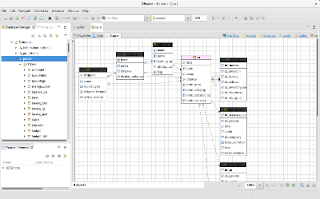
DBeaver is free universal database manager, so far this app is the best tool for managing databases You can download it here: http://dbeaver.jkiss.org/download/