Posts

Eth0 tidak bisa UP setelah clone VM

Penyebab perbedaan HW Address (MAC) rm /etc/udev/rules.d/70-persistant-net.rules reboot

Decrypt bitcoin wallet backup

The manual backup files are encrypted using your chosen password. You can use OpenSSL to decrypt: openssl enc -d -aes-256-cbc -a -in FILENAME From: https://github.com/schildbach/bitcoin-wallet/tree/master/wallet   openssl enc -d -aes-256-cbc -md md5 -a -in FILENAME   and then use wallet-tool from bitcoinj   Instruction: https://github.com/bitcoin-wallet/bitcoin-wallet/blob/master/wallet/README.recover.md

OTA checklist nexus 4 Kitkat

Download stock recovery image Return your recovery to stock recovery, use: fastboot flash recovery RECOVERY.IMG Download 4.4 OTA image from: http://forum.xda-developers.com/showthread.php?t=2145848 Go to recovery, use: adb reboot recovery Press volume UP + POWER quickly Choose apply update from ADB In your laptop, use: adb sideload OTA.zip If you get permission denied: sudo ./adb kill-server sudo ./adb devices Reboot Other tips from Android authority (To fix power button menu and some button not showing):  adb shell am start -n com.google.android.setupwizard/.SetupWizardTestActivity

Bebas dari iklan operator

Kalau browsing menggunakan handphone, pasti akan muncul iklan2 dari operator. Padahal kita sudah bayar langganan pulsa internet ya? Iklan yg muncul bisa interstitial atau dibagian atas situs yg kita buka. Yg ngeselin, situs yg kita buka jadi berantakan layout nya dan tidak bisa di zoom atau scroll. Bagaimana caranya agar bebas dr iklan2 tersebut? Di Android caranya sangat mudah, yaitu dengan menginstall aplikasi OrBot. Jika ingin transparan proxy, android anda harus di root lebih dulu. Jika tidak di root, dapat menggunakan Firefox dgn plugin orbot.

Backup whole system remotely

In console A: $ ssh hostname -R 60000:localhost:60000 $ sudo su # tar cjv -O --one-file-system --exclude=/backup2l* --exclude=/var/cache/* / | nc localhost 60000 In console B (your local desktop): $ nc -l 60000 > backup-hostname.tar.bz2 Then verify your backup

Sign out from Hangout

Google has replace Talk app to Hangout. If we have multiple accounts on phone, we can sign out other account. Open Hangout app Tap "..." Settings Tap account you wish to sign out scroll down, and tap Sign out

adb backup and adb restore

So I want to root my Nexus 4. Do full backup using adb, root it, and restore it... but failed. And my data almost gone :( Before doing this, you must enable Developer mode, Enable USB debugging, install ADB on your laptop. To backup: adb backup -f backup.ab -apk -shared -all -nosystem #add -nosystem for unrooted device or will hang Then root your device: #please find tutorial elsewhere Reboot your phone, say no to all question, enable USB debugging again Reboot your phone, add all google accounts, install all purchased app. Before restoring, enable Airplane mode, Stop all possible task from Settings - Apps - Running Open other console to monitor restore progress, run adb logcat Now restoring, adb restore backup.ab #unlock phone and click Restore #wait until no other progress (watch on other console) #reboot, Ctrl-C and try to repeat restore until restored normally #restoring shared data will take long time UPDATE: Use my script to backup all apps to separate...

Script to count quota usage using postfixadmin and maildir (postfix vda)

xoxoxoxoxoxo The script begin here: xoxoxoxoxoxo   echo "updating quota2" #change to maildir folder cd /home/vmail/yourdomain.com #write in one line du -s * | awk '{ print "insert into quota2 values (\"" $2 "\"," $1 "*1000,1000) on duplicate key update bytes=" $1 "*1000;" }' | mysql -uroot -pyourpassword postfixadmin   echo "done" xoxoxoxoxoxo end of script xoxoxoxoxoxo Put the script in crontab, run as often as you wish. Modify /etc/postfixadmin/config.inc.php: $CONF['domain_path'] = 'YES'; $CONF['domain_in_mailbox'] = 'YES'; $CONF['used_quotas'] = 'YES'; $CONF['new_quota_table'] = 'YES';

Ubuntu one for note is dead, now I'm using evernote

Image
Usually i use tomdroid to take notes on Android and sync it to my ubuntu using Tomboy, so I can read or add it later, even offline. But Ubuntu one for note is dead, now I'm using evernote. For ubuntu, I use WINE (PlayOnLinux) to install windows version of evernote, it work nicely :D. Now notes get sync, and allow offline editing. PS: Google Keep has good and clean interface on android, but lack of desktop version. And have to get online for editing note.

Solve video tearing on nVidia + GNOME 3

Most important is:  I'm using two monitor using TwinView, which have different refresh rate. I'm playing movie on second monitor. Go to Nvidia Settings, click X Screen 0 - X Server XVideo Settings, Sync to this display device: Choose my second monitor The other settings in referenced URL is for 3D application / OpenGL Check it out: http://sn0v.wordpress.com/2012/01/09/solve-video-tearing-on-nvidia-gnome-3/

How to mount Android on Ubuntu

Starting from ICS, android phone can not be mounted as raw filesystem, but MTP instead. Use this app to mount your Android on Ubuntu, without problem: https://github.com/hanwen/go-mtpfs

Cara maksa move to sd card (android)

Install android SDK dulu khad@onyx:~$ adb devices List of devices attached CB5A1HAB4A    device    (device harus kedetek) khad@onyx:~$ adb shell shell@android:/ $ pm set-install-location 2 shell@android:/ $ exit Lalu masuk ke menu  android, Settings - Apps - On SD Card Aplikasi yg tadinya tidak bisa dipindahkan, sekarang bisa Move to SD card Note: Semakin sedikit sisa free space, akan semakin lemot android saat write data http://www.bongizmo.com/blog/speed-up-android-phone-free-up-internal-storage/ http://www.bongizmo.com/blog/moving-all-android-apps-to-sdcard-apps2sd-froyo/

Learning SPAM from gmail.com :)

vi .fetchmailrc poll imap.gmail.com with proto IMAP user 'xxxx@gmail.com' there with password 'xxxx' options keep ssl sslfingerprint '23:07:E6:52:04:EC:0E:45:65:9B:39:10:63:F0:E7:95' folder [Gmail]/Spam mda '/usr/bin/spamc -u amavis -L spam' keep no rewrite poll alt1-mail.ssss.com with proto IMAP user 'xxxx@xxxx.com' there with password 'xxxx' folder INBOX.Spam options ssl sslfingerprint 'FB:9D:14:94:FD:F1:C6:87:0E:73:6A:A5:9F:2B:CF:5D' mda '/usr/bin/spamc -u amavis -L spam' keep no rewrite poll alt1-mail.ssss.com with proto IMAP user 'xxxx@xxxx.com' there with password 'xxxx' folder INBOX.NotSpam options ssl sslfingerprint 'FB:9D:14:94:FD:F1:C6:87:0E:73:6A:A5:9F:2B:CF:5D' mda '/usr/bin/spamc -u amavis -L forget' keep no rewrite poll alt1-mail.ssss.com with proto IMAP user 'yyyy' there with password 'yyyy' folder INBOX.Spam options ssl sslfingerprint 'F...

Postfix complete install

(in progress) aptitude install postfix pilih: internet site aptitude install postfix-mysql mysql-client mysql-server aptitude install courier-authdaemon courier-authmysql aptitude install courier-imap courier-imap-ssl courier-pop courier-pop-ssl create dir for web based admin: Yes dpkg -r --force-depends gamin libgamin0 aptitude install fam libfam0 aptitude install libsasl2-modules-sql ------------ aptitude install postfixadmin service apache2 restart Buka pake browser: http://ip.address/postfixadmin/setup.php masukin password, submit, copas ke /etc/postfixadmin/config.inc.php  $CONF['setup_password'] = 'bla bla bla'; ubah juga:  $CONF['domain_path'] = 'YES'; $CONF['quota'] = 'YES'; masukin password tadi, masukin email login admin dan passwordnya Buka pake browser: http://ip.address/postfixadmin/ Tambahin domain dan mailbox ------------ Liat password db di /etc/postfixadmin/dbconfig.inc.php vi ...

Change timezone after OS installed

Ubuntu server: # dpkg-reconfigure tzdata CentOS: # rm /etc/localtime # ln -s /usr/share/zoneinfo/Asia/Jakarta  /etc/localtime # reboot

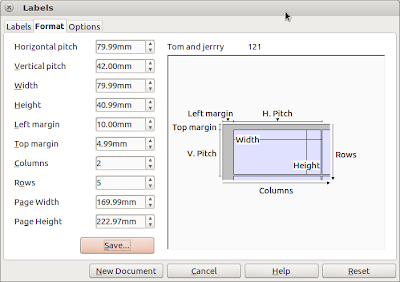
Setting open office u label tom & jerry

Image
Tom & Jerry no 121 Berikut cara membuat dokumen label untuk stiker tom & jerry: File - New Database (buat database baru dan isinya, import dari spreadshet juga bisa) File - New Labels, setting seperti gambar di atas untuk stiker tom & jerry nomor 121 Klik New Document Klik Print, jawab yes, kemudian pilih record yg mau di print

Using Firefox now, Google chrome trashing my disk :(

I stop using Firefox now, because Google chrome trashing my disk :( (wake up disk too often in laptop mode) To check what is using your disk: stop rsyslog echo 1 > /proc/sys/vm/block_dump watch 'dmesg -T | tail -35 ' Misc: You may want to add commit=600,relatime to / and /home to /etc/fstab Read also: eatmydisk

Mysql on low memory system

This will reduce mysql memory usage on system with low memory, for example 256MB: Edit /etc/mysql/my.cnf [mysqld] .... innodb=OFF default-storage-engine=MyISAM .... service mysql restart

Custom script: set cpu governor to powersave

Custom script to set cpu governor to powersave when using battery, and return to ondemand when plugged cat /etc/pm/power.d/90khad #!/bin/sh batt() { echo powersave > /sys/devices/system/cpu/cpu0/cpufreq/scaling_governor echo powersave > /sys/devices/system/cpu/cpu1/cpufreq/scaling_governor echo powersave > /sys/devices/system/cpu/cpu2/cpufreq/scaling_governor echo powersave > /sys/devices/system/cpu/cpu3/cpufreq/scaling_governor } ac() { echo ondemand > /sys/devices/system/cpu/cpu0/cpufreq/scaling_governor echo ondemand > /sys/devices/system/cpu/cpu1/cpufreq/scaling_governor echo ondemand > /sys/devices/system/cpu/cpu2/cpufreq/scaling_governor echo ondemand > /sys/devices/system/cpu/cpu3/cpufreq/scaling_governor } case $1 in     true) batt ;;     false) ac ;;     *) exit $NA ;; esac exit 0

Daftar applet/indicator di ubuntu

Wah, banyak indicator yang keren2 di ubuntu, lihat di sini: http://askubuntu.com/questions/30334/what-application-indicators-are-available Yang gw install: System Load Indicator (grafik cpu) Dropbox Hardware Sensors Indicator (untuk temperatur)