Posts

Milestone overclock script

This is my milestone auto start script, which inserted to mot_boot_mode so i get overclock on boot. The kernel is from stock 02.36.0, version 2.6.29-omap1 #!/system/bin/sh insmod / data / data / pt . com . darksun . milestoneoverclock / files / overclock . ko omap2_clk_init_cpufreq_table_addr = 0xc004e4b0 # continued on one line: omap2_clk_init_cpufreq_table_addr = 0xc004e4b0 echo 66 > /proc/ overclock / max_vsel echo 800000 > /proc/ overclock / max_rate echo 1 125000000 32 > /proc/ overclock / mpu_opps echo 2 250000000 39 > /proc/ overclock / mpu_opps echo 3 550000000 56 > /proc/ overclock / mpu_opps echo 4 600000000 60 > /proc/ overclock / mpu_opps echo 5 800000000 66 > /proc/ overclock / mpu_opps echo 0 800000 > /proc/ overclock / freq_table echo 1 550000 > /proc/ overclock / freq_table echo 2 250000 > /proc/ overclock / freq_table echo 3 125000 > /proc/ overclock / freq_table The setting will override default cpu...

My phone evolution

Image
My phone evolution in order: Nokia 6110 (stolen) Siemens ME45 (broken) Palm Treo 650 (somewhere) Motorola Razr2 V8 (for sale, not really) Motorola Milestone (now)

Ubuntu 10.04 dont serve PHP script problem

After upgrading to Ubuntu 10.04 all my php script not working. this is because new stupid feature new configuration in apache2 which disable php in user directories. To fix: vim /etc/apache2/mods-available/php5.conf Remark all user dir related config, change to: <IfModule mod_php5.c> <FilesMatch "\.ph(p3?|tml)$"> SetHandler application/x-httpd-php </FilesMatch> <FilesMatch "\.phps$"> SetHandler application/x-httpd-php-source </FilesMatch> # To re-enable php in user directories comment the following lines # (from <IfModule ...> to </IfModule>.) Do NOT set it to On as it # prevents .htaccess files from disabling it. #<IfModule mod_userdir.c> # <Directory /home/*/public_html> # php_admin_value engine Off # </Directory> #</IfModule> </IfModule> Then restart apache. You may need to clear firefox cache. _

Format sdcard option (updated)

Sometimes when copying lots of files to sdcard causes corrupt in portable device. To avoid this we can increase cluster size when formatting. This will also increase read/write performance on sdcard. Under linux we can use: mkfs.vfat -h0 -n MYSDCARD -S 4096 -v /dev/sdc1 UPDATE: using command above seems dont compatible on Windows, you can use this application: http://www.ridgecrop.demon.co.uk/index.htm?fat32format.htm or use this compatible command: mkfs.vfat -s 32 -S 512 -n "USB DISK" /dev/sdc1 mkfs.vfat -s 64 -S 512 -n "USB DISK" /dev/sdc1 mkfs.vfat -s 128 -S 512 -n "USB DISK" /dev/sdc1

HACK: Freeing internal memory (movecache)

For the sake of knowledge, i made cache for my thread because alldroid.org might be wiped for unknown reason (got email from admin) HACK: Freeing internal memory (movecache) tested on Droid, Milestone Start here: http://khad.landak.com/alldroid/

Remove mail queue (spam) quickly

Find out size of spam emails: # /opt/zimbra/postfix/sbin/postqueue -p | head -Queue ID- --Size-- ----Arrival Time---- -Sender/Recipient------- E13B82CF2D27* 3874 Tue Apr 27 11:06:01 peter@springresort.com.tw (delivery temporarily suspended: connect to genie.com[169.132.165.132]: Connecti on timed out) cle2322518@genie.com (delivery temporarily suspended: connect to genie.net[169.132.165.132]: Connecti on timed out) We get 3874 Now, remove the spam: # /opt/zimbra/postfix/sbin/postqueue -p | grep 3874 | awk -F '\*|\!| ' '{ print $1 }' | /opt/zimbra/postfix/sbin/postsuper -d - postsuper: EEE0E6EE02D9: removed postsuper: 4553C6EE0013: removed postsuper: 6AB126EE035D: removed postsuper: Deleted: 102837 messages

Change key character for droid/milestone

Sometimes I want to write IP Address using hardware keyboard. Press alt key twice to lock, then we can type numbers and symbols. But when alt mode, period key (.) will change to (:) which makes 192:168:10:10 So I want to change some other key to period (.) in alt mode, I choose Tab key. 1. First you must root your droid, which not covered here. 2. Get binary file contain key characters: /system/usr/keychars/sholes-keypad.kcm.bin using adb or copy it to sdcard 3. Modify the file using hex editor (i use bless) find sequence: A.1.a.A.. the last dot is char 09 which is tab, change it to period (char 2E) save 4. Copy back and replace /system/usr/keychars/sholes-keypad.kcm.bin 5. adb reboot

OpenDNS atau Google public DNS

Mau pake OpenDNS atau Google public DNS? Pake dua-duanya aja, ini isi resolv.conf di laptop gw: $ cat /etc/resolv.conf options rotate nameserver 208.67.222.222 nameserver 8.8.8.8 options rotate digunakan untuk menggunakan dns secara bergantian. biar isi resolv.conf ngga berubah karena network manager atau pppd, set immutable: $ chattr +i /etc/resolv.conf

Menggunakan headset bluetooth pada Karmic Koala

Image
Ubuntu 9.10 atau Karmic Koala baru saja di-rilis dan memiliki dukungan yang lebih baik untuk bluetooth. Untuk menggunakan headset bluetooth sekarang sangat mudah, tinggal pairing device, ubah profil A2DP, lalu pilih Sound Output. Berikut langkah-langkahnya: 1. Pairing Klik pada applet bluetooth -> Setup new device... nyalakan headset pada mode pairing / discoverable. Klik forward kemudian pilih headset anda untuk pairing. Jika ditanya masukkan password: 1234 atau 0000 2. Ubah profil A2DP Kemudian klik tombol kanan pada Sound applet -> Sound Preferences. Lalu ke tab Hardware. Pilih headset anda (misal Motorola HT820) kemudian pada profile pilih High Fidelity Playback (A2DP). Langkah ini cukup anda lakukan satu kali. 3. Pilih Sound Output Langkah terakhir adalah memilih sound output ke headset anda pada tab Output. Jalankan aplikasi rhythmbox atau totem. Sekarang anda dapat mendengarkan musik atau film melalui headset bluetooth. Catatan: Jika headset anda support AVRCP (tombol Next...

Bug kernel linux (2009)

Ditemukan bug di kernel linux yang cukup serius, penyebabnya NULL pointer. Kalau di-exploit bisa sampai dapet root... osram........ The system would do anything for you.. Hampir semua kernel dari versi 2.4 sampai 2.6 terkena bug ini: - Linux 2.4, from 2.4.4 up to and including 2.4.37.4 - Linux 2.6, from 2.6.0 up to and including 2.6.30.4 exploit testing: $ ./script [+] MAPPED ZERO PAGE! [+] Resolved selinux_enforcing to 0xffffffff80bb4348 [+] Resolved selinux_enabled to 0xffffffff80bb4344 [+] Resolved security_ops to 0xffffffff80bb2ae0 [+] Resolved default_security_ops to 0xffffffff808e55a0 [+] Resolved sel_read_enforce to 0xffffffff803e16e0 [+] Resolved audit_enabled to 0xffffffff80ae2ec4 [+] Resolved commit_creds to 0xffffffff8026d3f0 [+] Resolved prepare_kernel_cred to 0xffffffff8026d040 [+] got ring0! [+] detected 2.6 style 4k stacks sh: mplayer: not found [+] Disabled security of : nothing, what an insecure machine! [+] Got root! # # id uid=0(root) gid=0(root) # Ori...

Cara buat SSL certificate

$ openssl req -new -newkey rsa:1024 -days 365 -nodes -x509 -keyout www.example.com.pem -out www.example.com.pem Generating a 1024 bit RSA private key ............++++++ ...........++++++ writing new private key to 'www.example.com.pem' ----- You are about to be asked to enter information that will be incorporated into your certificate request. What you are about to enter is what is called a Distinguished Name or a DN. There are quite a few fields but you can leave some blank For some fields there will be a default value, If you enter '.', the field will be left blank. ----- Country Name (2 letter code) [ID]: State or Province Name (full name) [Indonesia]: Locality Name (eg, city) [Jakarta]: Organization Name (eg, company) [Nama Perusahaan, PT.]: Organizational Unit Name (eg, section) []:2009 (isi taun sekarang) Common Name (eg, your name or your server's hostname) []:www.namaserverlo.com Email Address []:email@ namaserverlo.com Terus tinggal masukin di httpd.conf: ...

Cara konversi movie untuk PSP

Sebelum bisa jalanin movie di PSP.. harus dikonversi dulu. Ini batasannya: Video Codec: xvid, divx, H.264 Audio codec: FAAC File Format: mp4 Bit rate harus Resolution: 320x240, 640x480 Cara konversinya bisa menggunakan tool ffmpeg. Kalau mau hasilnya bagus.. command line-nya panjang banget. Biar gampang pake script ini aja: ################################# script start: konvertpsp INPUT="$*" # harus .mp4 OUTPUT="out.mp4" # 2-31 QUALITY=21 ################################# if [ "$INPUT" = "" ]; then echo "Please specify input file" exit fi opt1=" -vcodec libx264 -coder 1 -flags +loop -cmp +chroma -partitions +parti4x4+partp8x8+partb8x8 -me_method hex -subq 6 -me_range 16 -g 250 -keyint_min 25 -sc_threshold 40 -i_qfactor 0.71 -b_strategy 1 -level 21 -refs 2" opt2="-cqp $QUALITY" opt3="-ab 64k" opt4="-s qvga" echo -- -- ffmpeg -i "$INPUT" $opt1 $opt2 $opt3 $opt4 -threads 3 $O...

How fast your Linux boot?

Image
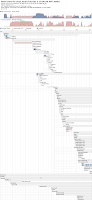
Currently it takes > 35 seconds too boot, see this chart: See if I can improve this.. in my next post. You can also make this kind of chart by installing: sudo apt-get install bootchart For reference: http://aldeby.org/blog/index.php/speed-up-your-ubuntu-linux-boot.html

JKSE 2y

Image
just a note

Best Old Games

Ini game-game lama yang menurut gw paling keren gameplay-nya ... walaupun grafiknya masih cupu Starcraft 2 Caesar 3 Transport Tycoon Deluxe - sekarang modnya openttd Warcraft 3 - game sepanjang jaman.. sekarang modnya Dota (Defense of the Ancient) Resident Evil - versi pertamanya Prince of Persia - yang versi 2D mau nambahin....?

Chatting lokal (LAN)

Image
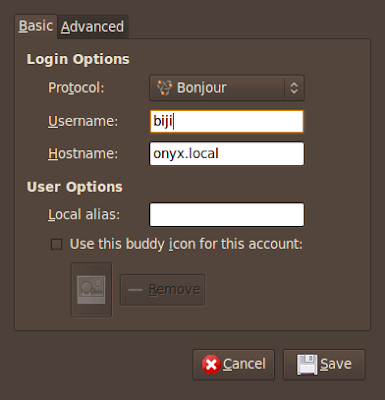
Ok..... gimana caranya chatting lokal antara teman sekantor? tapi bukan menggunakan Yahoo messenger, Jabber, MSN, dll... chatting tanpa menggunakan Server? Dengan menggunakan pidgin kita bisa chatting di LAN tanpa menggunakan server. Protokol yang digunakan adalah Bonjour. Tambahkan account di masing-masing komputer: Ubah First Name dan Last Name: Setelah itu login dan semua user di LAN otomatis akan muncul di Buddy List: - Bonjour menggunakan backend Avahi (zeroconf) ... kompatibel di Windows, OSX, Linux.. ini yang bikin keren ^^ - all screenshot taken from Ubuntu Intrepid Beta

Lenovo g410 on Hardy

Image
Ini pertama kali gw nginstal ubuntu di notbuk.. Ubuntu Hardy itu simple tapi high quality ^^ Audio : langsung jalan pake ALSA Card reader : langsung jalan gak perlu driver Networking: Ethernet : langsung jalan Networking: Wireless sudo apt-get install b43-fwcutter dah jalan.. tapi blom pernah coba konek Communications: Modem pake slmodem bawaan ubuntu nggak jalan, jadi download dari sini: http://linmodems.technion.ac.il/packages/smartlink/ download yg ini: SLMODEMD.gcc4.2.tar.gz extract, pindahin slmodemd ke /usr/sbin tambahin di /etc/rc.local: /usr/sbin/slmodemd -a modem:0 & wvdial.conf buat telkomnet instan: [Dialer i] Init1 = ATZ Init2 = ATQ0 V1 E1 S0=0 &C1 &D2 +FCLASS=0 Init3 = AT+MS=34 Phone = 080989999 Username = telkomnet@instan Password = telkom Modem = /dev/modem VGA Controller jalanin: sudo displayconfig-gtk Screen 1 -> Model: pilih LCD 1680x1050 (centangin wide screen) Graphics Card -> Driver: pilih intel Klik OK trus relogin Processor Biar bisa pilih...

distro timeline

Image
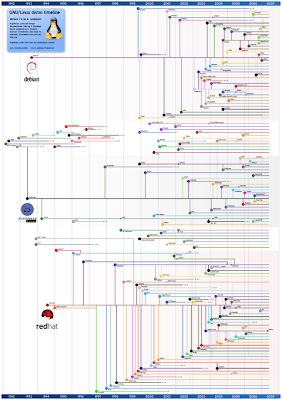
Ikutan juga posting ``distro timeline'' . Distro linux apa yang umurnya paling lama?? Wah baru tau... Opensuse ternyata turunan Slackware.

My phone can be telneted

cool...... my phone can be telneted... not emulated, but real operating system This how i did it: 1. First you have to reflash your phone using PoL (Power of Linux) enabled firmware, use monster pack 2. Enable USB-Lan .... go to Menu -> PoL -> USB-Lan Setup 3. Activate FTP & Telnet using same menu 4. setup IP Address for new detected device: 192.168.1.16 / 255.255.255.0 or: # /sbin/ifconfig usb0 192.168.16.1 5. try to ping your phone..... yup you can ping your phone # ping 192.168.16.2 PING 192.168.16.2 (192.168.16.2) 56(84) bytes of data. 64 bytes from 192.168.16.2: icmp_seq=1 ttl=64 time=5.24 ms 64 bytes from 192.168.16.2: icmp_seq=2 ttl=64 time=1.03 ms 64 bytes from 192.168.16.2: icmp_seq=3 ttl=64 time=1.03 ms --- 192.168.16.2 ping statistics --- 3 packets transmitted, 3 received, 0% packet loss, time 2007ms rtt min/avg/max/mdev = 1.034/2.439/5.248/1.986 ms 6. Now the fun begin: # telnet 192.168.16.2 Trying 192.168.16.2... Connected to 192.168.16.2. Escape character is ...

UNSUB BANJIR

Untuk berlangganan ketik SUB BANJIR kirim sms ke 2222 Untuk berhenti berlangganan ketik UNSUB BANJIR kirim sms ke 2222 Tarif per SMSnya Rp 2000,- (belum termasuk pajak) Kalau berlangganan.. rumah kamu bakal kebanjiran setahun sekali.